


Signed up for Capcut? No you didn't
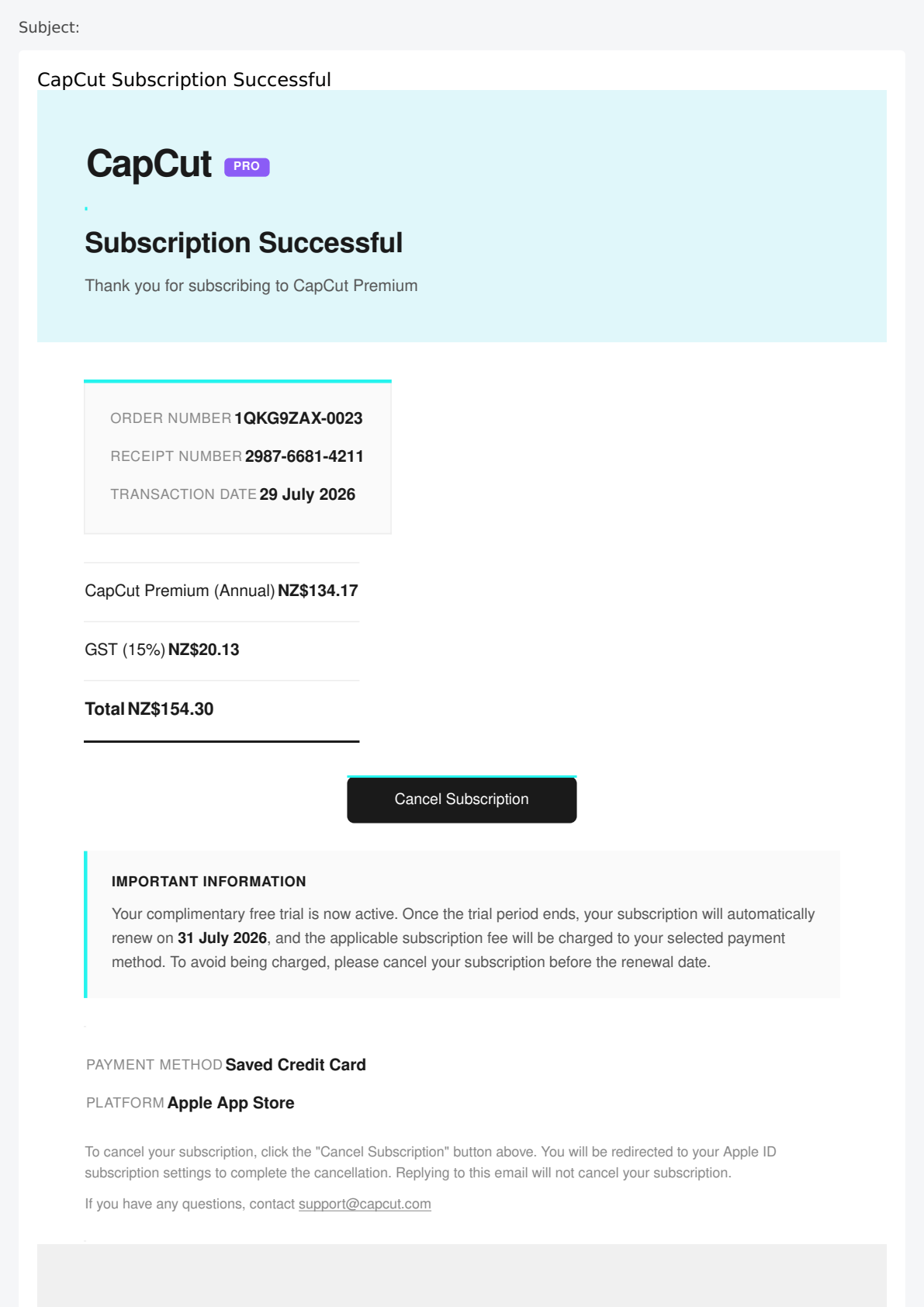
A coordinated campaign impersonating CapCut Pro is targeting New Zealand organisations with fraudulent payment confirmations to harvest credentials.
A high-fidelity phishing campaign has been detected impersonating CapCut Pro, specifically using 'Payment Confirmation' lures. The messages originate from the domain itdavs.com, which security telemetry indicates is being leveraged for automated retail and SaaS lures. Despite the domain passing all standard technical authentication checks (SPF, DKIM, and DMARC), the campaign is an unauthorized credential harvesting effort.
The email body typically includes a high-fidelity 'Receipt' image or HTML layout designed to replicate official CapCut branding. This image-based approach is a deliberate technique to bypass traditional text-based security filters that scan for keywords associated with phishing. By rendering the lure as an image, attackers ensure the malicious content remains visible to the user while being effectively invisible to automated scanning engines.
Organisations are advised to treat any unsolicited subscription or payment confirmation with extreme skepticism, especially those from unfamiliar domains like itdavs.com. Legitimate CapCut Pro billing and account management should be performed directly through the official capcut.com portal or the mobile application. Attackers frequently use these lures to create a sense of financial urgency, prompting users to click links to 'Cancel' or 'View' the transaction.
To mitigate this risk, organisations should enforce strict 'First Contact' safety tips and encourage users to report any suspicious internal mail via the 'Report Phishing' mechanism. Refining tenant-level reputation filtering based on these reports remains the most effective defense against campaigns that utilize high-reputation marketing infrastructure to deliver malicious content.
The domain the message claims to be from. Fresh registrations and known-bad reputations are the strongest technical tells of a spoofed sender.
Where a reply to this message would actually be delivered. When it differs from the visible From address, an unsuspecting reply lands with the attacker instead.
Practical steps you or your IT provider can take to reduce the risk from this kind of threat.
- Physical and Logical Isolation: Treat the itdavs.com domain as hostile and apply tenant-wide blocking; 2. Identity Verification: Educate users to verify account status strictly via official CapCut mobile applications or the capcut.com portal; 3. Forensic Reporting: Encourage staff to use the 'Report Phishing' mechanism for any unsolicited payment notifications; 4. Perimeter Hardening: Strengthen Safe Links policies to intercept and rewrite URLs from newly registered domains (<30 days old).

See what a genuine CapCut message looks like, the real sender domain, the real link destination, and where to report a fake.
The Local Vocal is published by Decision1 IT Solutions. If one of these landed in your inbox, or someone in the team clicked, give us a call.